Four mobile devices displaying the Globalworx app interface with issue alerts and product status, on a green to dark blue gradient background with the Tactiq logo and slogan 'Win retail' in the bottom right corner.
GlobalWorx

Merging two DSD platforms into one after an acquisition

Role: Sr. UX Designer, Design Lead

Team: Raina Asid, Product Designer

Year: 2024 to 2025

Introduction

Overview

GlobalWorx helps grocery and convenience retailers keep Direct Store Delivery (DSD) products on the shelf. When something's wrong, like an out-of-stock, a late delivery or a missing tag, store teams report it, the platform creates a ticket, and the right vendor is notified to fix it fast.

In 2024, Tactiq, a DSD software company with 20+ years in the space, acquired GlobalWorx and brought on major grocers like Kroger and ADUSA. Rather than run two products, Tactiq decided to retire both its own Pipeline 2.0 and legacy GlobalWorx and rebuild them as one platform under the GlobalWorx name.

Two products, one platform

The two products served very different retail worlds. Pipeline 2.0 was strong in convenience stores but couldn't scale to grocery. Legacy GlobalWorx had the big grocers, but years of patchwork had left it slow and inconsistent

.I started by auditing the one feature that carries 90% of usage, then used what I found to shape the new platform: a rebuilt reporting flow, camera-based scanning, and a design system that flexes across 22 retailer configurations without becoming 22 products.

The Problem

Neither product could do the job alone

Pipeline 2.0: Great for small stores, stuck there

Strong in convenience and specialty retail. But it ran on AWS, a dealbreaker for grocers competing with Amazon, and it wasn't built for multi-store or multi-department operations or modern API integrations.

GlobalWorx: The right customers, the wrong experience

Had the enterprise grocers, but years of patchwork left it inconsistent and slow. Customer surveys called out poor usability, little visibility into ticket status, and trouble scaling across large networks.

The decision: rebuild from scratch

Patching either one wasn't going to work. Tactiq decided to sunset both and rebuild under the GlobalWorx name. Before designing anything new, I needed to know exactly where the old experience was breaking down.

Research & Discovery

UX health Audit: the feature that carries 90% of the platform

Submit Service Issue is how stores tell vendors something is wrong: an out-of-stock, a late delivery, a missing tag. It's used on a phone, often one-handed, on a store floor or receiving dock, across 17 configurations. Customer feedback told us people were frustrated, but not where or why. So I built a scoring model with five pillars, each anchored to a question a real user would ask, and five criteria per pillar scored from 1 (critical) to 5 (optimal).
  • Clarity & Communication: Does the system keep me informed and focused?
  • Intuition & Familiarity: Does this work the way I expect it to?
  • Safety & Error Management: Am I allowed to make mistakes without fear?
  • Efficiency & Performance: Does the system value my time and intent?
  • Support & Self-Education: Is help available exactly when I need it?

UX health map

Submit Service Issue is how stores tell vendors something is wrong: an out-of-stock, a late delivery, a missing tag. It's used on a phone, often one-handed, on a store floor or receiving dock, across 17 configurations. Customer feedback told us people were frustrated, but not where or why. So I built a scoring model with five pillars, each anchored to a question a real user would ask, and five criteria per pillar.
‍
Critical
1
2
3
4
5
Optimal
Criteria
Service Alert
Receiving Violation
Vendor Violation
01Clarity & Communication
6/25
6/25
6/25
Functional Feedback & Affordance
2
2
2
Information Hierarchy & Scannability
1
1
1
Content Precision & Noise Reduction
1
1
1
Visual Legibility & Environment
1
1
1
Information Structure & Grouping
1
1
1
02Intuition & Familiarity
6/25
6/25
6/25
Mental Model & Language Alignment
1
1
1
Internal & External Consistency
1
1
1
Navigation Stability & Wayfinding
1
1
1
Workflow Logic & Continuity
2
2
2
Interaction Standards & Affordance
1
1
1
03Safety & Error Management
6/25
6/25
6/25
Preventive Guidance & Constraints
2
2
2
Forgiveness & Reversibility
1
1
1
Warning & Confirmation Guardrails
1
1
1
Human-Centric Error Messaging
1
1
1
Assisted Recovery & Support
1
1
1
04Efficiency & Performance
5/25
5/25
5/25
Streamlined Task Progression
1
1
1
Workspace Memory & Persistence
1
1
1
Adaptive Support (Beginner to Expert)
1
1
1
Cognitive Load & Automation
1
1
1
Technical & Physical Responsiveness
1
1
1
05Support & Self-Education
5/25
5/25
5/25
In-Context Guidance & Tooltips
1
1
1
Searchable Knowledge & Instructions
1
1
1
Support Escalation & Continuity
1
1
1
Recognition Support & History
1
1
1
Logic Transparency & Direct Manipulation
1
1
1

What the scores pointed to

  • Submitting felt like a gamble
    Submit was hidden below the fold in 16 of 17 configurations. Errors fired all at once, up to 10+ toasts that vanished before you could read them.
  • The form asked backwards
    Five selections before you could describe the issue, a 39-item list with no search, and duplicate alcohol issue types.
  • Small bugs, platform-wide reach
    Invisible selected states, white-on-white focus rings and tiny tap targets. Each one was a single component breaking every form
  • Language that blamed the user
    Routine reports were "Violations," and placeholders called optional fields required.
  • No safety net
    No undo, no help, nothing remembered. Five alerts meant picking the same manufacturer five times.

The bright spot

Picking a manufacturer filled in the distributor. That became the principle for the rebuild: the form should do the work it can.

Designing the new GlobalWorx

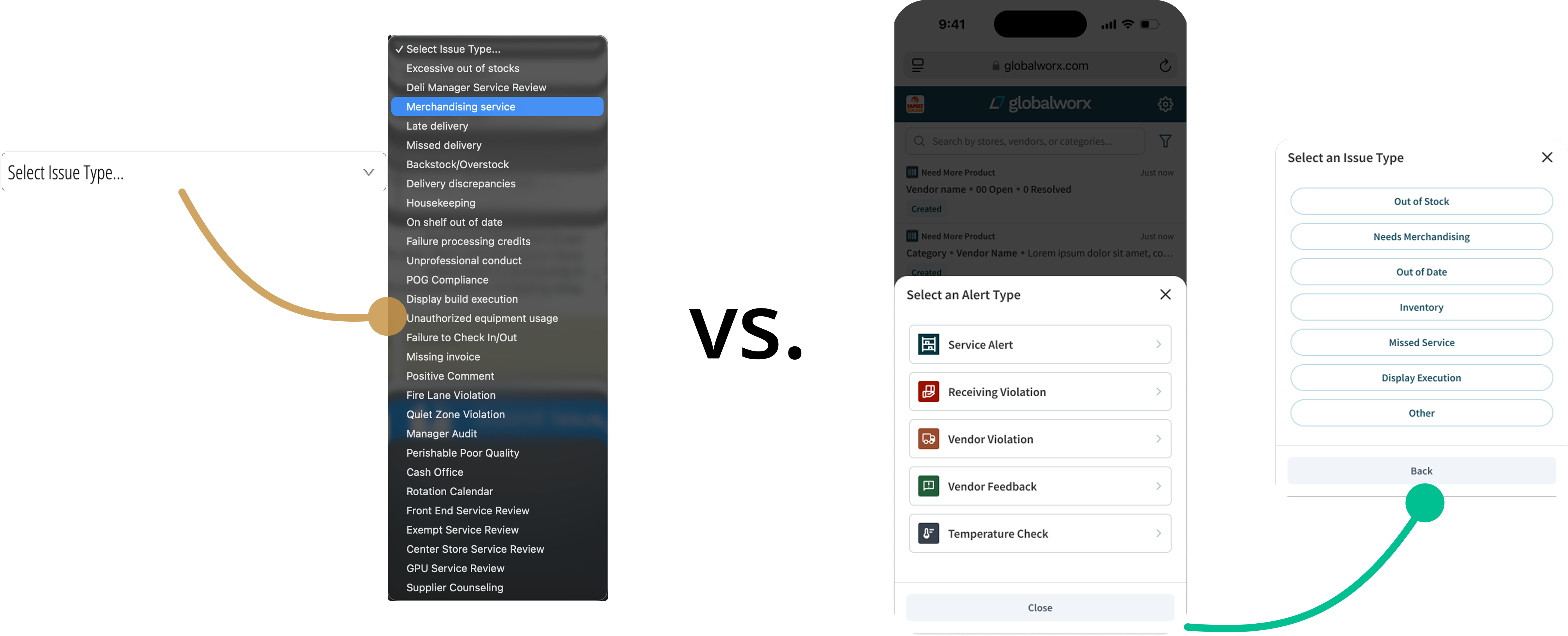
Diagram showing three user interface screens for selecting issue types in a software application: a dropdown menu highlighting 'Merchandising service,' a mobile screen with alert categories including 'Service Alert' and 'Receiving Violation,' and a selection menu listing issue types like 'Out of Stock,' 'Needs Merchandising,' and 'Missed Service.'

A reporting flow that works with you

The audit became the roadmap. Issue type comes first, then the vendor. The form breaks into steps and only shows what's relevant. Submit stays visible, errors appear inline next to the field, and a confirmation keeps you in context with a "Submit another" option for reps filing several in a row.

Scanning without the special hardware

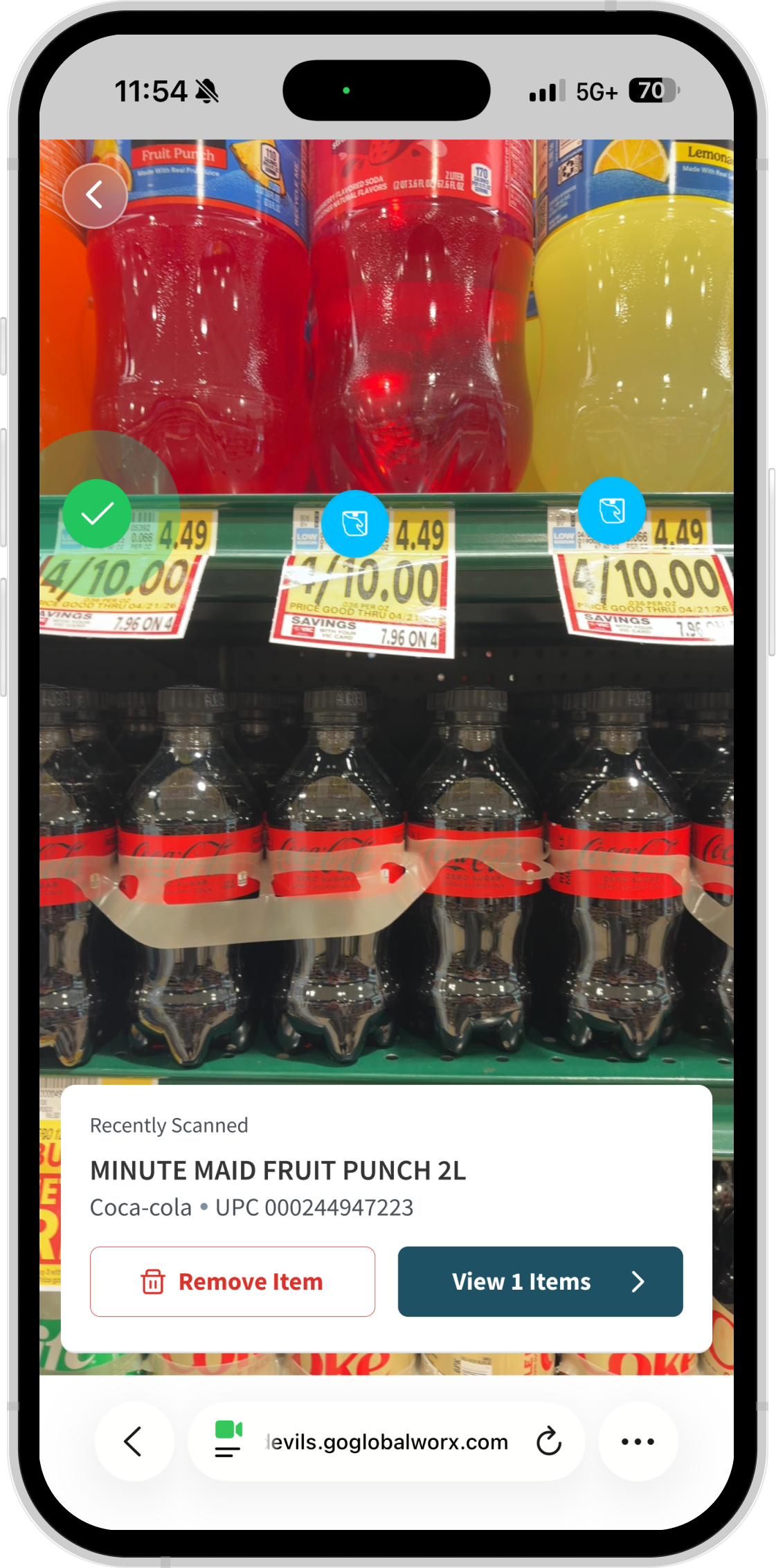
Scanning was Pipeline's signature feature, but it was tied to Zebra devices. I redesigned it for phone cameras and third-party scanners. Our first version auto-scanned barcodes, but in testing it kept grabbing products next to the one you wanted on crowded shelves. So I switched to tappable icons on each detected barcode. Reps pick the exact item, then add a photo and notes so the report has enough context to resolve.
‍
Smartphone screen displaying a grocery store shelf with bottles of Minute Maid Fruit Punch and Coca-Cola Zero Sugar, along with sale price tags showing 4 for $10. A mobile app overlay shows a recently scanned Minute Maid Fruit Punch 2L with options to remove the item or view one item.
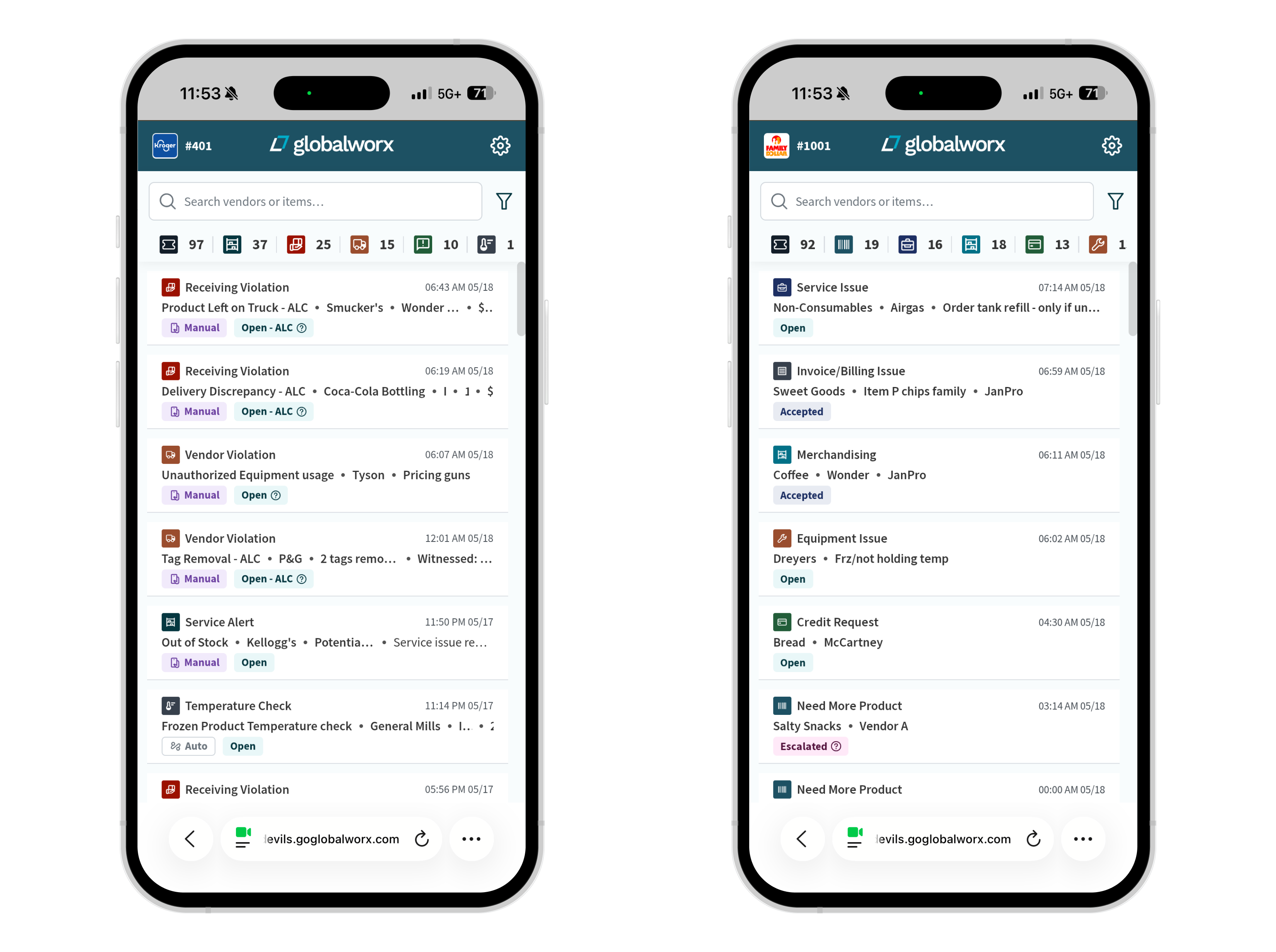
Two smartphones side by side, each displaying the Globalworx app interface. The left phone shows various issue categories like Receiving Violation, Vendor Violation, Service Alert, and Temperature Check with details such as companies, times, and statuses including Manual and Open-ALC. The right phone displays issue categories such as Service Issue, Invoice/Billing Issue, Merchandising, Equipment Issue, Credit Request, and Need More Product with statuses like Open, Accepted, and Escalated. Both have search bars at the top and a toolbar with filters above the issue lists.

One design system, many configurations

The new platform had to serve four distinct user experiences across 22 retailer configurations. I built a token-based system with primitives and component-level variables, so a retailer's setup changes through configuration, not custom design work. It also meant
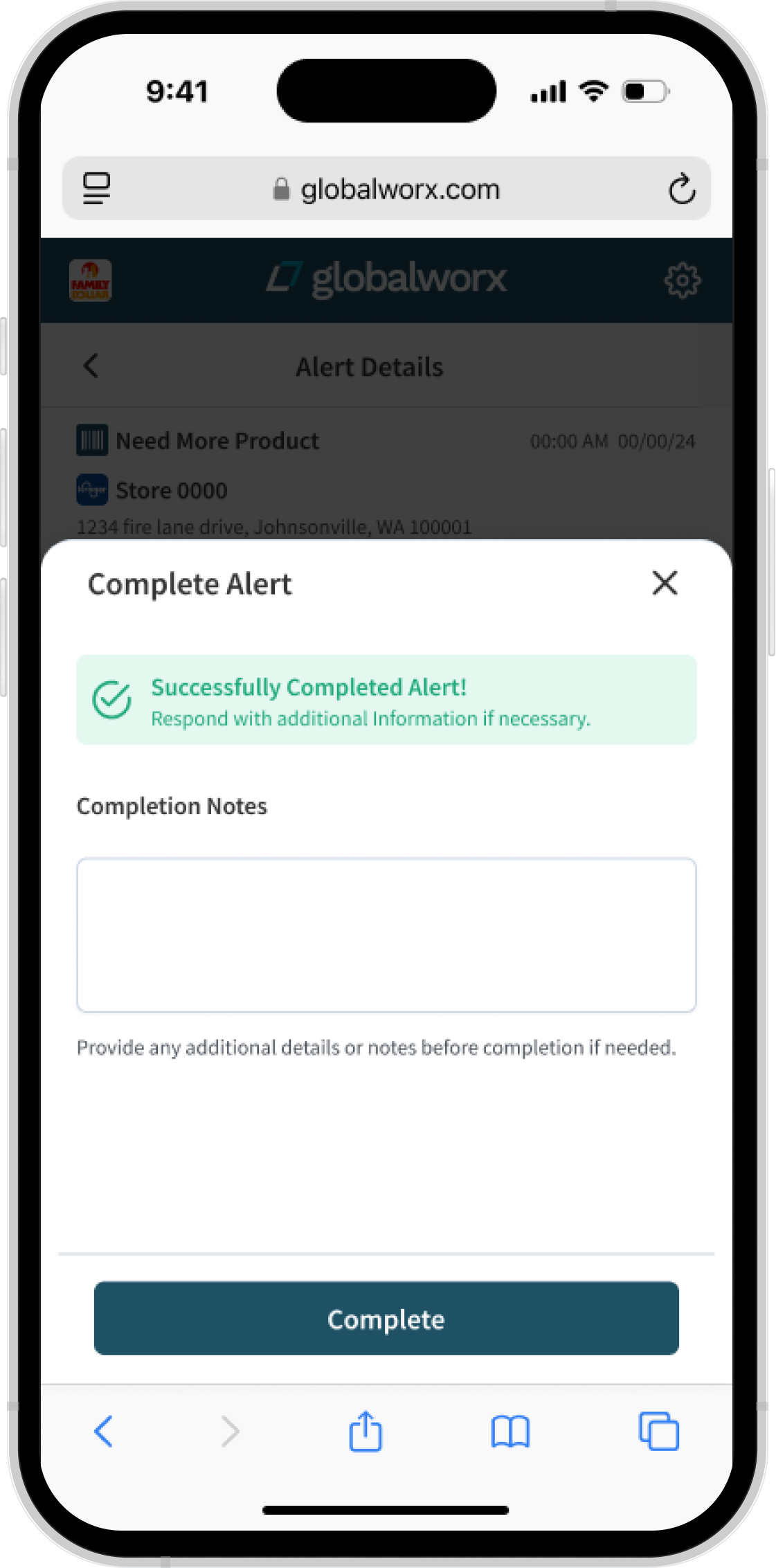
Mobile screen showing a completed alert on globalworx.com for Store 0000 with message 'Successfully Completed Alert! Respond with additional Information if necessary.' There is a text box for completion notes and a blue Complete button below.

One way to report,
one place to follow up

Every retailer handled issues differently. We unified ticketing, messaging and notifications into one workflow, so stores, distributors and manufacturers all see the same status, and nobody has to chase a report to find out where it stands.

Results

What changed

  • Two legacy products and their user bases merged into one platform
  • A design system now running 5 user experiences and 22 retailer configurations
  • Improved adoption rates among vendors and retail managers due to simplified UI and mobile scanning
  • A reusable audit framework the team can run on any feature

What I learned

Design for the person doing the work: The platform matched how corporate saw the problem, not how store teams lived it. The customer signs the contract, but the manager in grocery store  is the one who has to use it.